 By
By name: iblai-project description: Add the in-process Projects surface (project landing page — chat input + project files + instructions + assigned agents) to a Next.js app globs: alwaysApply: false
/iblai-project
Add the ibl.ai project surface to your Next.js app: project files,
project instructions, list of agents assigned to a project, and the
project-scoped chat input. Reuses the SDK's Chat component — when you
pass a projectId, the SDK automatically swaps its default
welcome/explore surface for ProjectLandingPage. The same <Chat> you
already mounted for /iblai-agent-chat does both modes; this skill
just adds the routing + URL plumbing.
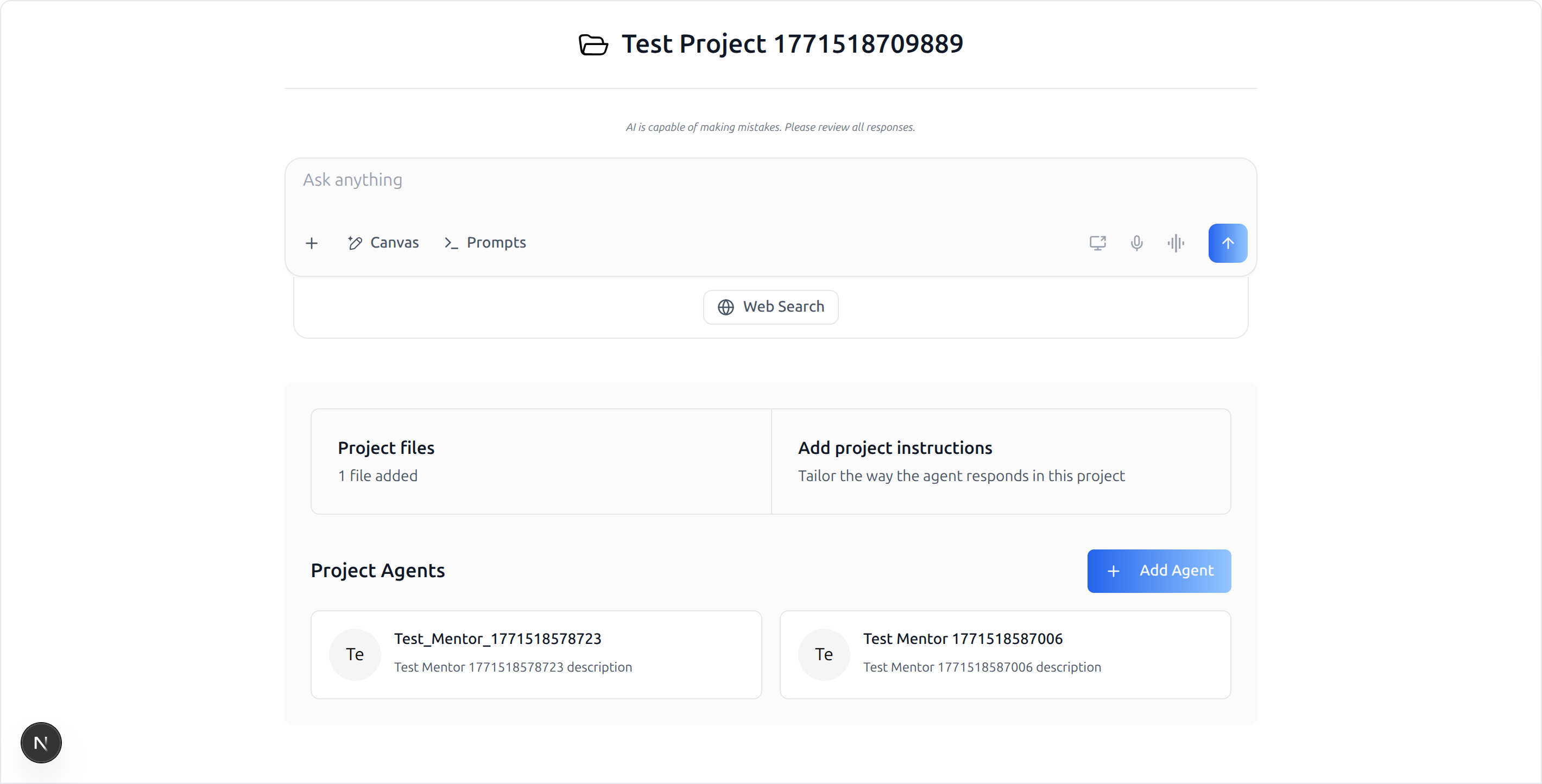
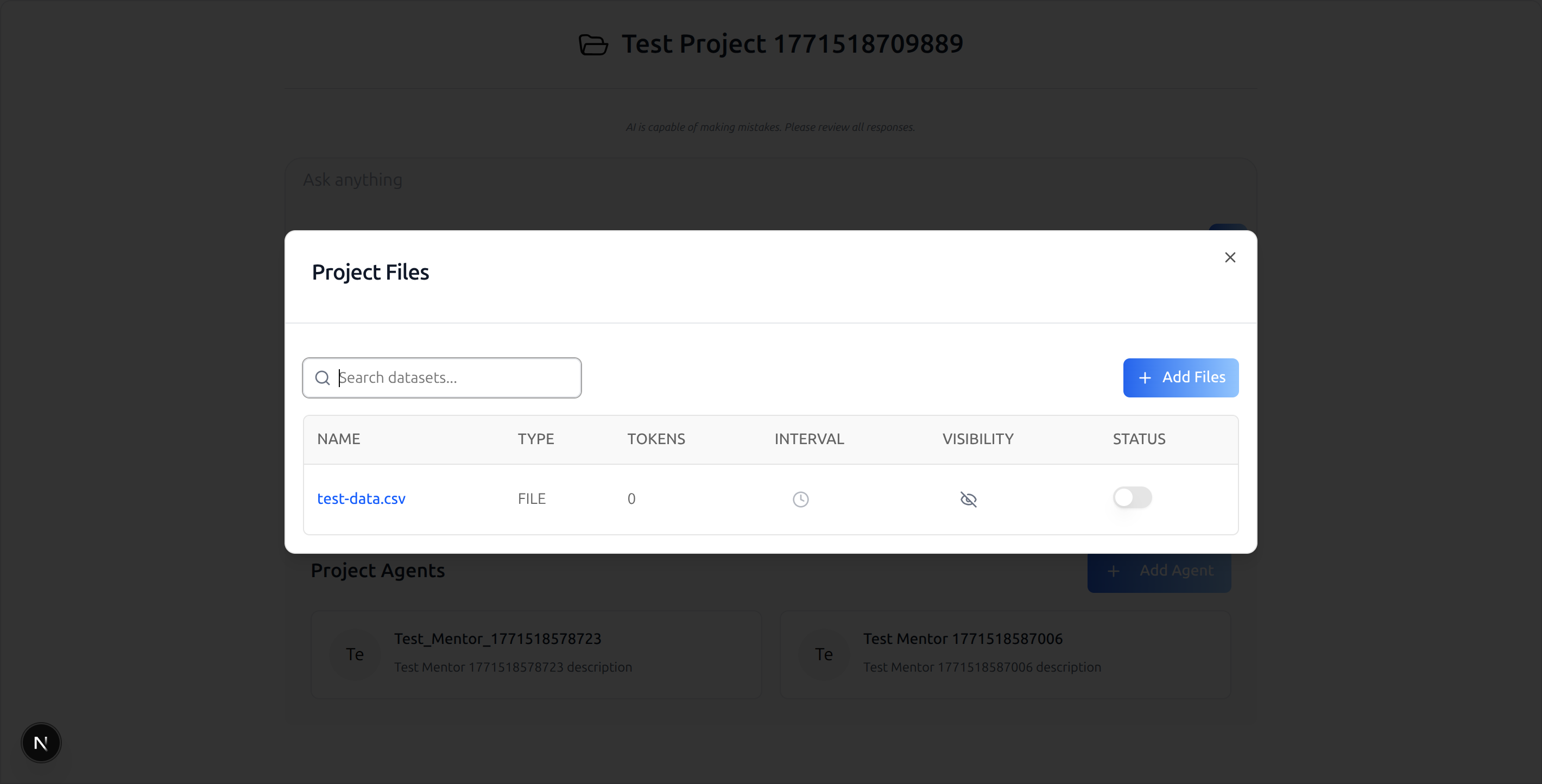
What you get: a route at
/agents/[mentorId]/projects/[projectId]that reads both IDs from the URL, hands them to<Chat>, and the SDK renders the project landing page (chat input + Project files / Add project instructions cards + Project Agents grid). Clicking "Project files" opens the SDK'sProjectFilesModal. Clicking "Add project instructions" opensProjectInstructionsModal. "Add Agent" opensAddMentorToProjectModal.
Do NOT add custom styles, colors, or CSS overrides to the SDK components. They ship with their own styling. Keep them as-is. Do NOT implement dark mode unless the user explicitly asks for it.
Common setup (brand, conventions, env files, verification): see docs/skill-setup.md.
Prerequisites
This skill is a thin delta on top of /iblai-agent-chat. It does
not duplicate the provider/store/peer-dep wiring — most of the
integration cost lives over there. Run /iblai-agent-chat first.
/iblai-agent-chatcomplete (providers wrapped, store reducers registered, service worker shipped, peer deps installed). The project surface uses the same<Chat>component, so the same wiring applies.An agent/mentor ID — same as
/iblai-agent-chat.A real
projectIdto test against. Either:- Create one in the admin UI, or
- List the user's projects:
GET https://api.iblai.org/dm/api/ai-mentor/orgs/<tenant>/users/<username>/projects/?limit=5(useAuthorization: Token <axd_token>).
Minimum SDK versions. The
projectIdprop on<Chat>and theProjectLandingPageslot were added in:package min version @iblai/iblai-js^1.11.0@iblai/web-containers^1.7.0@iblai/web-utils^1.7.0@iblai/data-layer^1.5.7@iblai/agent-ai^2.6.0Pre-flight prop check (do this before writing the route):
grep -q "projectId?: string" \
  node_modules/@iblai/web-containers/dist/next/index.d.ts \
  && echo "projectId prop present" \
  || echo "MISSING — upgrade @iblai/web-containers (Step 2)"
What Gets Wired
| File | Change |
|---|---|
package.json |
(No new packages — already covered by /iblai-agent-chat if both are on the same SDK release. If the host is on an older SDK, bump to the versions above.) |
app/agents/[mentorId]/projects/[projectId]/page.tsx |
New route rendering <Chat> with projectId={projectId} (Step 3) |
Step 1: Confirm /iblai-agent-chat is Wired
The project surface inherits all of /iblai-agent-chat's setup.
Don't proceed until you confirm:
| Check | Command / file |
|---|---|
Auth providers tree wrapped in <ServiceWorkerProvider> |
providers/index.tsx |
skip={isSsoLoginRoute} on Auth + Tenant providers |
providers/index.tsx |
chat, chatInput, chatSliceShared, files, rbac, subscription, topBanner reducers registered |
store/index.ts |
public/sw.js present |
ls public/sw.js |
@iblai/agent-ai installed |
cat node_modules/@iblai/agent-ai/package.json | grep version |
/agents/[mentorId]/chat-new route renders for an authed user |
open in browser |
If any of these fail, run /iblai-agent-chat first.
Step 2: Bump the SDK if Needed
If /iblai-agent-chat was set up against an older SDK release, bump
the packages so projectId is recognized:
pnpm add @iblai/iblai-js@^1.11.0 \
         @iblai/web-containers@^1.7.0 \
         @iblai/web-utils@^1.7.0 \
         @iblai/data-layer@^1.5.7 \
         @iblai/agent-ai@^2.6.0
Run the Pre-flight prop check in Prerequisites to confirm
projectId?: string is on the Chat Props type.
Step 3: Create the Route
Create app/agents/[mentorId]/projects/[projectId]/page.tsx:
"use client";

export const dynamic = "force-dynamic";

import { Suspense, useEffect, useState } from "react";
import { useParams, useRouter } from "next/navigation";
import { Chat, type ChatConfig } from "@iblai/iblai-js/web-containers/next";
import {
  useUsername,
  useAxdToken,
  useUserTenants,
  useVisitingTenant,
  useIsAdmin,
} from "@iblai/iblai-js/web-utils";
import { redirectToAuthSpa } from "@/lib/utils";
import { config } from "@/lib/config";

export default function AgentProjectPageWrapper() {
  return (
    <Suspense fallback={null}>
      <AgentProjectPage />
    </Suspense>
  );
}

function AgentProjectPage() {
  const { mentorId, projectId } = useParams<{
    mentorId: string;
    projectId: string;
  }>();
  const router = useRouter();
  const [tenantKey, setTenantKey] = useState("");

  useEffect(() => {
    const appTenant = localStorage.getItem("app_tenant");
    const tenant = localStorage.getItem("tenant");
    let currentTenant = "";
    try {
      currentTenant =
        JSON.parse(localStorage.getItem("current_tenant") ?? "{}")?.key ?? "";
    } catch {}
    setTenantKey(
      appTenant || currentTenant || tenant || config.mainTenantKey(),
    );
  }, []);

  const username = useUsername();
  const axdToken = useAxdToken();
  const { userTenants } = useUserTenants();
  const { visitingTenant } = useVisitingTenant();
  const isAdmin = useIsAdmin();

  const chatConfig: ChatConfig = {
    baseWsUrl: () => config.wsUrl(),
    supportEmail: () =>
      process.env.NEXT_PUBLIC_SUPPORT_EMAIL ?? "support@ibl.ai",
    authUrl: () => config.authUrl(),
    mainTenantKey: config.mainTenantKey(),
    navigateToAdminBilling: () =>
      router.push(`/agents/${mentorId}/settings?tab=billing`),
    navigateToExplore: () => router.push("/agents"),
    navigateToMentor: (id) => router.push(`/agents/${id}`),
  };

  // Gate render until all 3 IDs are available — projectId from URL,
  // mentorId from URL, tenantKey from localStorage.
  if (!tenantKey || !mentorId || !projectId) return null;

  return (
    <div className="flex h-screen w-full flex-col">
      <Chat
        isPreviewMode={false}
        mentorId={mentorId}
        tenantKey={tenantKey}
        projectId={projectId}   /* ← only change vs /iblai-agent-chat */
        config={chatConfig}
        redirectToAuthSpa={redirectToAuthSpa}
        username={username ?? null}
        userTenants={userTenants ?? []}
        visitingTenant={visitingTenant}
        axdToken={axdToken ?? ""}
        userIsStudent={!isAdmin}
      />
    </div>
  );
}
Why each piece:
| Item | Why |
|---|---|
Same wrapper / Suspense / dynamic / chatConfig / hooks as /iblai-agent-chat |
The SDK component is the same; only the projectId prop differs. |
mentorId from useParams<{ mentorId; projectId }>() |
Project chats are mentor-scoped — the WebSocket session still needs a mentor. |
projectId from useParams<...>() |
Triggers the SDK to render ProjectLandingPage instead of the default welcome surface. |
if (!tenantKey || !mentorId || !projectId) return null |
All three are required; render only when all are resolved. |
tenantKey from localStorage (appTenant / current_tenant / tenant / config.mainTenantKey()) |
Matches /iblai-agent-chat's pattern. |
What the SDK Does With projectId
<Chat> itself doesn't change shape. Internally, when projectId is
truthy, the bundled WelcomeChatNew slot switches its render branch:
- Calls
useGetUserProjectDetailsQuery({ id: parseInt(projectId) }) - If the project resolves, renders
<ProjectLandingPage>with the project name, chat input, Project files card (opensProjectFilesModal), Add project instructions card (opensProjectInstructionsModal), and Project Agents grid (opensAddMentorToProjectModalfrom the "Add Agent" button) - If the project 404s, the surface renders empty — you'll see a clean
body and a
[data-layer] API errorin the console. Don't treat that as a bug in this skill; verify theprojectIdexists for the authenticated user/tenant.
The chat input you see in the project surface is the same chat input
as the regular <Chat> flow — sending a message creates a session
scoped to this project + mentor combo (the WebSocket URL still
uses mentorId).
Props
The full Chat props table is in /iblai-agent-chat. The
project-relevant delta:
| Prop | Type | Required | Description |
|---|---|---|---|
projectId |
string |
no | Stringified integer matching a project the user has access to. When set, the welcome surface switches to ProjectLandingPage. |
mentorId |
string |
yes | Still required even with projectId set — the chat session is mentor-scoped. |
ChatConfig is identical to /iblai-agent-chat — no project-specific
fields.
Step 4: Verify
pnpm build— must pass with zero errors.pnpm dev, log in, navigate tohttp://localhost:3000/agents/<mentorId>/projects/<projectId>.- You should see:
- The project name as the page heading (folder icon next to it)
- "AI is capable of making mistakes…" disclaimer
- "Ask anything" chat input with the standard action buttons (Canvas, Prompts, voice, screen-share, send) + Web Search toggle
- "Project files" card showing "N files added"
- "Add project instructions" card
- "Project Agents" section with the assigned mentor cards and an "Add Agent" button
- Click "Project files" → SDK's
ProjectFilesModalopens with the datasets table. - Open
/agents/<mentorId>/projects/<bad-id>to confirm graceful 404 handling (empty body + data-layer console error, no app crash).
If the project surface renders but the chat WebSocket can't connect,
that's a backend issue (LLM config on the mentor) — see
/iblai-agent-chat's Known issues.
CLI Integration (proposal — not yet implemented)
A future helper for this skill could:
- Verify
/iblai-agent-chatis wired — refuse to run if the provider/store/peer-dep setup isn't in place. Point the user at the/iblai-agent-chatskill first. - Bump the SDK if it's pinned below the versions in Prerequisites.
- Scaffold the route — write
app/agents/[mentorId]/projects/[projectId]/page.tsxparameterized on the host's existingredirectToAuthSpaandconfighelpers. - Skip if already added — detect the existing route file and no-op.
The generator should not regenerate /iblai-agent-chat artifacts —
the two skills compose (the project surface needs the agent-chat
wiring already done).
Brand guidelines: BRAND.md