 By
By name: iblai-course-access description: Add course-content pages (edX learner UI) to your Next.js app globs: alwaysApply: false
/iblai-course-access
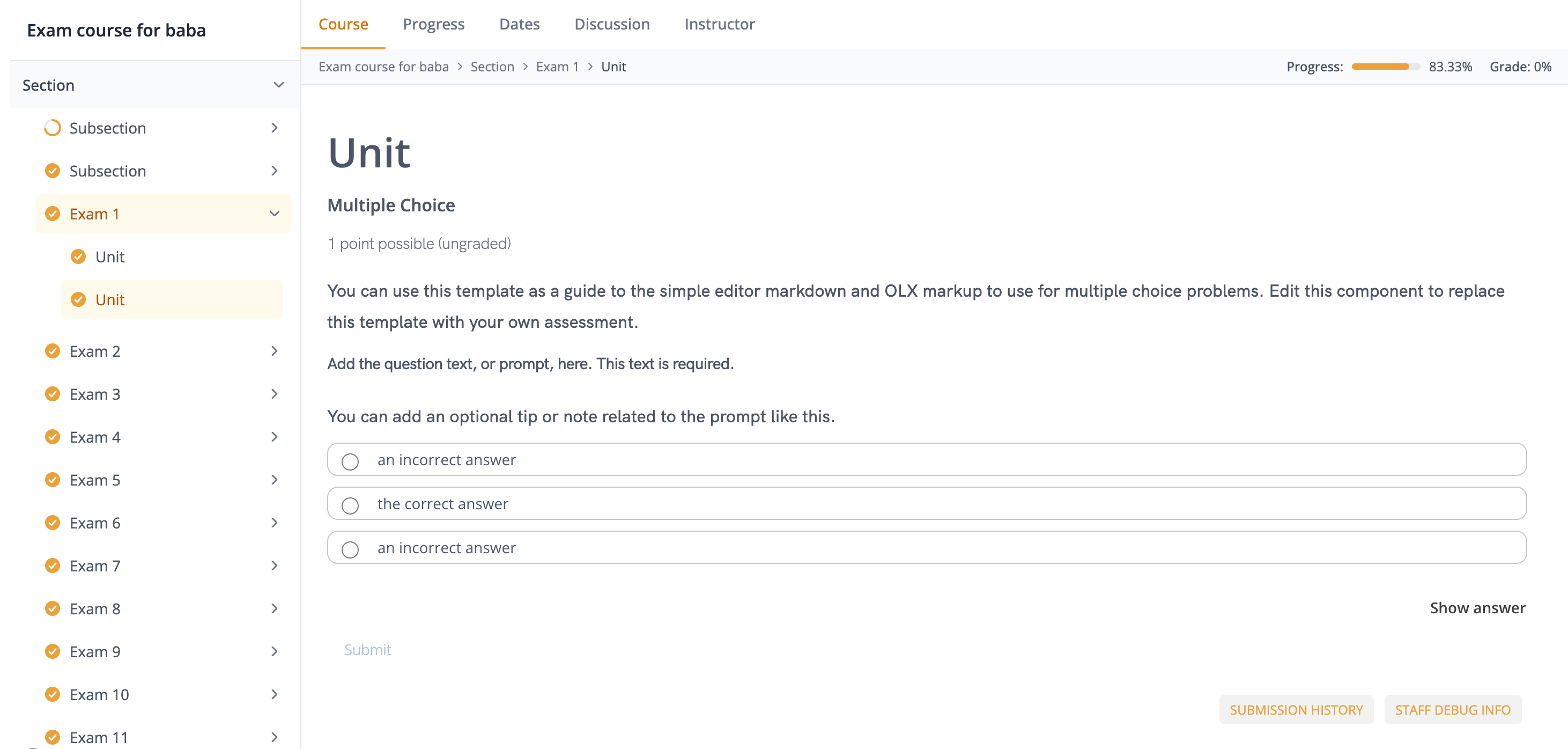
Add a full edX course-content experience -- hierarchical course outline sidebar, collapsible modules/lessons/sublessons with progress indicators, top tab strip (Course, Progress, Dates, Discussion, Instructor), breadcrumb
- progress bar header, embedded learning MFE / LMS iframe with JWT postMessage handshake, previous / next unit navigation, timed-exam guard, and tenant-based access control. Pulls course metadata, outline, completion, and grading data via the data-layer RTK Query hooks.
Do NOT add custom styles, colors, or CSS overrides to ibl.ai SDK components. They ship with their own styling. Keep the components as-is. Do NOT implement dark mode unless the user explicitly asks for it.
When building custom UI around SDK components, use the ibl.ai brand:
- Primary:
#0058cc, Gradient:linear-gradient(135deg, #00b0ef, #0058cc) - Button:
bg-gradient-to-r from-[#2563EB] to-[#93C5FD] text-white - Font: System sans-serif stack, Style: shadcn/ui new-york variant
- Follow the component hierarchy: use ibl.ai SDK components
(
@iblai/iblai-js) first, then shadcn/ui for everything else (npx shadcn@latest add <component>). Do NOT write custom components when an ibl.ai or shadcn equivalent exists. Both share the same Tailwind theme and render in ibl.ai brand colors automatically. - Follow BRAND.md for colors, typography, spacing, and component styles.
You MUST run /iblai-ops-test before telling the user the work is ready.
After all work is complete, start a dev server (pnpm dev) so the user
can see the result at http://localhost:3000.
iblai.env is NOT a .env.local replacement — it only holds the 3
shorthand variables (DOMAIN, PLATFORM, TOKEN). Next.js still reads
its runtime env vars from .env.local.
Use pnpm as the default package manager. Fall back to npm if pnpm
is not installed. The generated app should live in the current directory,
not in a subdirectory.
Common setup (brand, conventions, env files, verification): see docs/skill-setup.md.
Prerequisites
- Auth must be set up first (
/iblai-auth) - MCP server + skills configured (
@iblai/mcpin.mcp.json) - A valid edX course id (e.g.
course-v1:org+course+run). The user must already have a course published on their tenant. If not, direct them to their LMS Studio to create one.
Step 1: Check Environment
Before proceeding, check for a iblai.env
in the project root. Look for PLATFORM, DOMAIN, and TOKEN variables.
If the file does not exist or is missing these variables, tell the user:
"You need an iblai.env with your platform configuration. Download the
template and fill in your values:
curl -o iblai.env https://raw.githubusercontent.com/iblai/vibe/refs/heads/main/iblai.env"
You will also need the following in .env.local for the learning MFE / LMS
iframes to load correctly:
NEXT_PUBLIC_LMS_URL=https://lms.<your-platform>.iblai.app
NEXT_PUBLIC_MFE_URL=https://learning.<your-platform>.iblai.app
NEXT_PUBLIC_LEGACY_LMS_URL=https://lms.<your-platform>.iblai.app
NEXT_PUBLIC_DM_URL=https://dm.<your-platform>.iblai.app
Architecture
Course-content ships as SDK components with no CLI generator -- you wire
the pages yourself, similar to /iblai-workflow and /iblai-analytics.
Four files cover a production-quality course player:
app/(app)/course-content/
└── [course_id]/
    ├── layout.tsx                  # Wraps pages in CourseContentLayout
    ├── course/page.tsx             # Course body (default tab)
    ├── progress/page.tsx           # Progress tab
    ├── dates/page.tsx              # Dates tab
    ├── discussion/page.tsx         # Forum (route segment differs from tab)
    └── instructor/page.tsx         # Instructor tab (admin only)
The layout mounts CourseContentLayout, which owns the outline sidebar,
breadcrumb header, tab strip, and the two contexts (CourseOutlineContext,
EdxIframeContext). Each per-tab page.tsx renders a CourseContentTabPage
that shares those contexts via the surrounding layout.
Step 2: SDK Imports
Import course-content components directly. The framework-agnostic pieces
(outline, drawer, timed-exam, guard, loading, hooks, contexts, types) come
from @iblai/iblai-js/web-containers. The three Next-specific pieces
(CourseContentLayout, CourseContentTabPage, EdxIframe) come from
@iblai/iblai-js/web-containers/next because they import next/navigation
and next/link.
// Framework-agnostic
import {
  CourseOutline,
  CourseOutlineDrawer,
  CourseAccessGuard,
  CourseContentLoading,
  TimedExam,
  CourseOutlineContext,
  EdxIframeContext,
  useCourseDetail,
  useEdxIframe,
  useCourseNavigator,
} from "@iblai/iblai-js/web-containers";

// Next-specific (layout + iframe + tab page)
import {
  CourseContentLayout,
  CourseContentTabPage,
  EdxIframe,
} from "@iblai/iblai-js/web-containers/next";

// Data hooks (RTK Query)
import {
  useGetDepartmentMemberCheckQuery,
  useLazyGetExamInfoQuery,
  useCreateCourseEnrollmentMutation,
  useCreateStripeCheckoutSessionMutation,
  useLazyGetCourseCompletionQuery,
  useLazyGetCourseProgressQuery,
} from "@iblai/iblai-js/data-layer";
Step 3: Create the Layout
app/(app)/course-content/[course_id]/layout.tsx — mounts
CourseContentLayout, which renders the outline sidebar, tab strip, and
breadcrumb, and provides both course-content contexts to children.
"use client";

import type React from "react";
import { useCallback } from "react";
import { useParams, useRouter } from "next/navigation";
import { CourseContentLayout } from "@iblai/iblai-js/web-containers/next";
import { useGetDepartmentMemberCheckQuery } from "@iblai/iblai-js/data-layer";
import { toast } from "sonner";

import { resolveAppTenant } from "@/lib/iblai/tenant";

export default function CourseContentLayoutWrapper({
  children,
}: { children: React.ReactNode }) {
  const params = useParams<{ course_id: string }>();
  const router = useRouter();
  const courseId = decodeURIComponent(params.course_id);
  const tenant = resolveAppTenant();

  const { data: adminCheck } = useGetDepartmentMemberCheckQuery({
    platform_key: tenant,
  });
  const isPlatformAdmin = Boolean(adminCheck?.is_admin);

  const handleNavigate = useCallback(
    (href: string, opts?: { external?: boolean }) => {
      if (opts?.external) {
        window.location.href = href;
      } else {
        router.push(href);
      }
    },
    [router],
  );

  return (
    <CourseContentLayout
      courseId={courseId}
      currentTenant={tenant}
      isPlatformAdmin={isPlatformAdmin}
      dmUrl={process.env.NEXT_PUBLIC_DM_URL ?? ""}
      courseEligibilityEnabled
      onUnauthorized={() => router.push("/error/403")}
      onNotFound={() => router.push("/error/404")}
      onNavigate={handleNavigate}
      onError={(msg) => toast.error(msg)}
      onSuccess={(msg) => toast.success(msg)}
      onCourseMentorChange={(uuid) => {
        // Optional: wire the course's attached mentor into your chat widget
      }}
    >
      {children}
    </CourseContentLayout>
  );
}
Key patterns
isPlatformAdmingates theInstructortab. Derive it fromuseGetDepartmentMemberCheckQuery({ platform_key: tenant })— the layout does NOT read it itself.onUnauthorized/onNotFound: the layout never callsrouter.pushdirectly. Wire these to your error routes. Wrap them inuseCallback(or hoist to module scope) soCourseAccessGuarddoesn't refire them.onNavigate: the layout calls this for lesson open, access course, and Stripe checkout redirects.opts.external === truemeans full-page navigation; otherwise userouter.push.dmUrl: required for the Stripesuccess_urlreturned byuseCourseDetail. Read fromNEXT_PUBLIC_DM_URL.courseEligibilityEnabled: passtrueto opt into the richer enrollment / eligibility branch (Enroll Now / Buy Now / Request Access labels). Passfalse/ omit for the simple "Access Course" branch.
Step 4: Create the Per-Tab Pages
Each tab is its own Next.js route. They all render CourseContentTabPage,
which mounts EdxIframe and signals the active tab to
EdxIframeContext (wired by the layout).
Note the route segment / tab-value mismatch: the forum tab is served at
/discussion. The default tabHrefTemplate in the layout maps
forum → discussion. If you use a different base path, override
tabHrefTemplate.
app/(app)/course-content/[course_id]/course/page.tsx
"use client";

import { CourseContentTabPage } from "@iblai/iblai-js/web-containers/next";

const iframeProps = {
  lmsUrl: process.env.NEXT_PUBLIC_LMS_URL ?? "",
  mfeUrl: process.env.NEXT_PUBLIC_MFE_URL ?? "",
  legacyLmsUrl: process.env.NEXT_PUBLIC_LEGACY_LMS_URL ?? "",
};

export default function CoursePage() {
  return <CourseContentTabPage tab="course" {...iframeProps} />;
}
Remaining tabs
| Route | tab value |
|---|---|
/course-content/[course_id]/course |
"course" |
/course-content/[course_id]/progress |
"progress" |
/course-content/[course_id]/dates |
"dates" |
/course-content/[course_id]/discussion |
"forum" |
/course-content/[course_id]/instructor |
"instructor" |
Each page is identical except for the tab prop. The instructor page does
NOT self-gate non-admin viewers — the layout hides the tab button when
isPlatformAdmin is false, but a direct URL visit will still render.
If you need a hard gate, wrap the page in your own admin guard.
Step 5: Use MCP Tools for Customization
get_component_info("CourseContentLayout")
get_component_info("CourseContentTabPage")
get_component_info("EdxIframe")
get_component_info("CourseOutline")
get_hook_info("useCourseDetail")
get_hook_info("useEdxIframe")
get_hook_info("useCourseNavigator")
<CourseContentLayout> Props
Next-specific. Owns CourseOutlineContext + EdxIframeContext.
Required
| Prop | Type | Description |
|---|---|---|
courseId |
string |
edX course id (the [course_id] path param) |
isPlatformAdmin |
boolean |
Whether the viewer is an admin on the current tenant (gates the instructor tab) |
currentTenant |
string |
Tenant / platform key the viewer operates in |
dmUrl |
string |
LMS data-management base URL — used to build the Stripe success_url |
children |
ReactNode |
Per-tab content (typically a CourseContentTabPage) |
Optional
| Prop | Type | Description |
|---|---|---|
tabHrefTemplate |
(args: { courseId: string; tab: string }) => string |
Override the per-tab href. Defaults to /course-content/${courseId}/${routeSegment} |
onUnauthorized |
() => void |
Fired when the viewer's tenant can't see the course |
onNotFound |
() => void |
Fired when the course fetch fails |
onNavigate |
(href: string, opts?: { external?: boolean }) => void |
Wires lesson open, access course, and Stripe checkout redirects |
onError |
(message: string) => void |
Toaster hook for failures |
onSuccess |
(message: string) => void |
Toaster hook for successes |
courseEligibilityEnabled |
boolean |
Opt into the richer eligibility branch (Enroll Now / Buy Now / Request Access) |
onCourseMentorChange |
(mentorUuid: string | null) => void |
Fires when the fetched course exposes a mentor_uuid and isn't mentor_hidden — wire to your chat widget |
<CourseContentTabPage> Props
Next-specific. Renders <EdxIframe /> inside the layout's
EdxIframeContext and sets the active tab.
| Prop | Type | Description |
|---|---|---|
tab |
"course" | "dates" | "progress" | "bookmarks" | "forum" | "instructor" |
Which edX tab this page represents |
lmsUrl |
string |
LMS base URL |
mfeUrl |
string |
Learner MFE base URL |
legacyLmsUrl |
string |
Legacy LMS base URL |
edxTokenKey |
string? |
localStorage key for the edX JWT token. Defaults to "edx_jwt_token" |
sandbox |
string? |
iframe sandbox attribute. Defaults to the permissive set for the learning MFE |
<EdxIframe> Props
Next-specific. Used directly only if you render the iframe outside the
standard tab page flow. Otherwise, prefer CourseContentTabPage.
Same props as CourseContentTabPage minus tab.
<CourseOutline> Props
Framework-agnostic. Reads everything from CourseOutlineContext — no
props. Rendered automatically by CourseContentLayout (desktop sidebar +
mobile drawer). Use it directly only if you build a custom layout; wrap it
in a <CourseOutlineContext.Provider value={...} />.
<CourseOutlineDrawer> Props
Framework-agnostic. Mobile drawer wrapping CourseOutline in a Sheet.
Also context-driven — no props.
<CourseAccessGuard> Props
Framework-agnostic. Gates children on a clean authorized load. Used
internally by CourseContentLayout but exposed for custom shells.
| Prop | Type | Description |
|---|---|---|
course |
CourseEdxData | null |
From useCourseDetail |
courseInfoLoadingState |
"not-started" | "loading" | "successful" | "failure" |
From useCourseDetail |
currentTenant |
string |
Platform key the viewer operates in |
onUnauthorized |
() => void |
Fires once when the course's platform_key is neither "main" nor currentTenant |
onNotFound |
() => void |
Fires once when the course fetch fails |
children |
ReactNode |
Rendered only on a clean authorized load |
Wrap onUnauthorized / onNotFound in useCallback (or hoist to module
scope) to avoid spurious re-fires.
<TimedExam> Props
Framework-agnostic. Renders the timed-exam blocker overlay when the current
subsection is a proctored exam. Reads from EdxIframeContext — no props.
Rendered automatically by EdxIframe.
<CourseContentLoading> Props
Framework-agnostic. Full-height spinner skeleton. No props. Use as a
Next loading.tsx export:
// app/(app)/course-content/[course_id]/loading.tsx
"use client";
import { CourseContentLoading } from "@iblai/iblai-js/web-containers";
export default CourseContentLoading;
Hooks
All framework-agnostic (import from @iblai/iblai-js/web-containers).
useCourseDetail({ courseId, dmUrl, courseEligibilityEnabled?, onNavigate?, onError?, onSuccess? })
Returns the fetched course metadata, outline, completion, progress,
grading policy, and a set of handlers (handleFetchCourseInfo,
handleFetchCourseSyllabus, handleOpenLesson, handleFetchCourseProgress,
handleFetchCourseCompletion, handleCourseAction, etc.). Used
internally by CourseContentLayout — you typically don't call it
yourself.
useEdxIframe({ lmsUrl, mfeUrl, legacyLmsUrl })
Returns getIframeURL, findSequentialParent, getUnitToIframe, and
getParentsInfosFromSublessonId. Used internally by EdxIframe.
useCourseNavigator(courseOutline, currentUnitId)
Returns a navigator with moveToPrevious(), moveToNext(),
isPreviousHidden(), isNextHidden(), plus the flattened
thirdLevelChildren index. Used internally by EdxIframe for the
previous / next unit buttons.
Contexts
Both framework-agnostic.
CourseOutlineContext
Exposes courseOutline, courseOutlineLoading, expandedModule,
expandedLessons, selectLesson, toggleModule, toggleLesson,
currentChapter, currentLesson, course, courseOutlineDrawerOpen,
setCourseOutlineDrawerOpen, currentUnitID, refetchCourseOutline.
Set up by CourseContentLayout.
EdxIframeContext
Exposes iframeUrl, setIframeUrl, courseOutline, activeTab,
setActiveTab, courseID, currentlyInExamSubsection,
setCurrentlyInExamSubsection, examInfo, setExamInfo, refresher,
setRefresher. Set up by CourseContentLayout.
Custom Routing
If your app doesn't live at /course-content/[course_id], override
tabHrefTemplate:
<CourseContentLayout
  // ...
  tabHrefTemplate={({ courseId, tab }) => {
    const segmentMap: Record<string, string> = {
      course: "content",
      progress: "progress",
      dates: "schedule",
      forum: "discussion",
      instructor: "admin",
    };
    return `/learn/${courseId}/${segmentMap[tab] ?? tab}`;
  }}
>
  {children}
</CourseContentLayout>
The tab value passed to CourseContentTabPage stays the same
(e.g. "forum"); only the route segment changes.
Step 6: Redux Store
@iblai/iblai-js/data-layer ships coreApiSlice, mentorReducer, and
mentorMiddleware — you already have them if you ran /iblai-auth.
No additional slices are required for course-content. The hooks used
internally (useGetExamInfoQuery, useGetCourseCompletionQuery,
useGetCourseProgressQuery, useCreateCourseEnrollmentMutation,
useCreateStripeCheckoutSessionMutation) all live on coreApiSlice.
Verify your store/iblai-store.ts includes:
import {
  coreApiSlice,
  mentorReducer,
  mentorMiddleware,
} from "@iblai/iblai-js/data-layer";

export const store = configureStore({
  reducer: {
    [coreApiSlice.reducerPath]: coreApiSlice.reducer,
    mentor: mentorReducer,
  },
  middleware: (getDefaultMiddleware) =>
    getDefaultMiddleware()
      .concat(coreApiSlice.middleware)
      .concat(mentorMiddleware),
});
Without mentorReducer / mentorMiddleware, the course-content hooks
silently return undefined.
Step 7: Verify
Run /iblai-ops-test before telling the user the work is ready:
pnpm build— must pass with zero errorspnpm test— vitest must pass- Start dev server and touch test:
Replacepnpm dev & npx playwright screenshot "http://localhost:3000/course-content/<course-id>/course" /tmp/course.png<course-id>with a URL-encoded course id the user has access to (e.g.course-v1%3Aibl%2BDEMO%2B2024).
Common Pitfalls
forumtab at/discussion: The route segment isdiscussion, the tab value is"forum". The defaulttabHrefTemplatehandles this mapping. If you overridetabHrefTemplate, preserve the mapping.Instructor page not gated by default:
CourseContentLayouthides the instructor tab button whenisPlatformAdminis false, but the route itself is not self-guarded. A non-admin visiting the URL directly will still render the iframe. Wrap the page in your own guard if you need a hard gate.onUnauthorized/onNotFoundre-fires: Stabilize these withuseCallback— otherwiseCourseAccessGuard's effect will re-run on every render and push twice.dmUrlmissing: Required for Stripe checkout'ssuccess_url. Without it, the paid-enrollment branch ofuseCourseDetailthrows.platform_key: "main"exception:CourseAccessGuardalways allows courses whoseplatform_key === "main". This is intentional — global catalog courses bypass the tenant check.iframe JWT postMessage:
EdxIframelistens forauth.jwt.readyfrom the MFE and replies with the JWT stored atedxTokenKey("edx_jwt_token"by default). If you use a custom localStorage key, pass it viaedxTokenKeyon everyCourseContentTabPage.mentor_hiddensuppressesonCourseMentorChange: If a course hasmentor_hidden: true, the callback is never fired — do not wire fallback mentors from the caller side.useCourseDetailis internal: Don't call it from pages — the layout already calls it and exposes state viaCourseOutlineContext. Calling it again creates duplicate fetches and stale state.
Important Notes
- Import paths: framework-agnostic from
@iblai/iblai-js/web-containers, Next-specific (CourseContentLayout,CourseContentTabPage,EdxIframe) from@iblai/iblai-js/web-containers/next. - Redux store: must include
mentorReducerandmentorMiddleware initializeDataLayer(): 5 args (v1.2+)@reduxjs/toolkit: deduplicated via webpack aliases innext.config.ts- Env vars:
NEXT_PUBLIC_LMS_URL,NEXT_PUBLIC_MFE_URL,NEXT_PUBLIC_LEGACY_LMS_URL,NEXT_PUBLIC_DM_URL - Brand guidelines: BRAND.md