 By
By name: iblai-agent-sandbox description: Add the agent Sandbox tab (OpenClaw instance management, agent prompt configuration, and agent skills) to your Next.js app globs: alwaysApply: false
/iblai-agent-sandbox
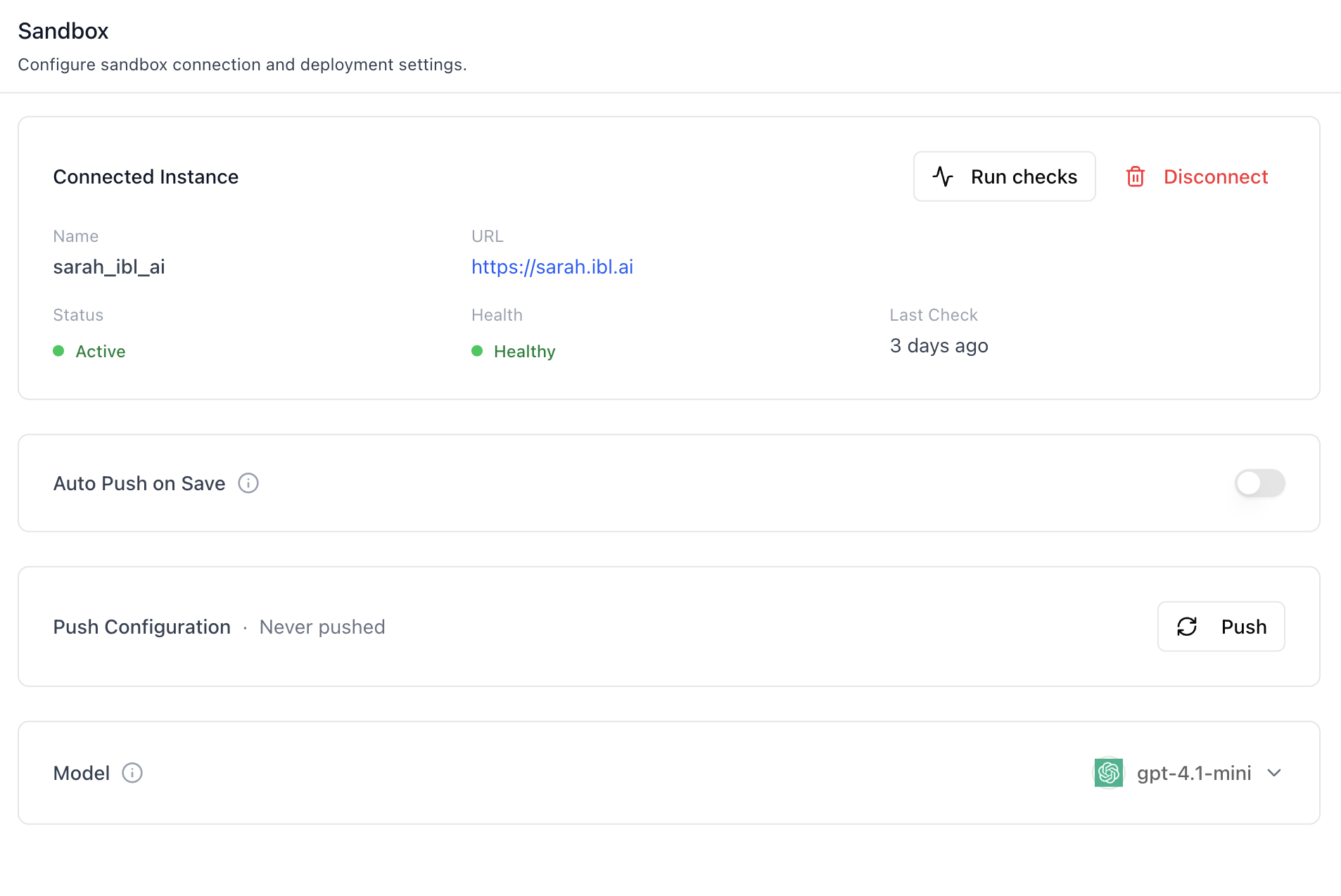
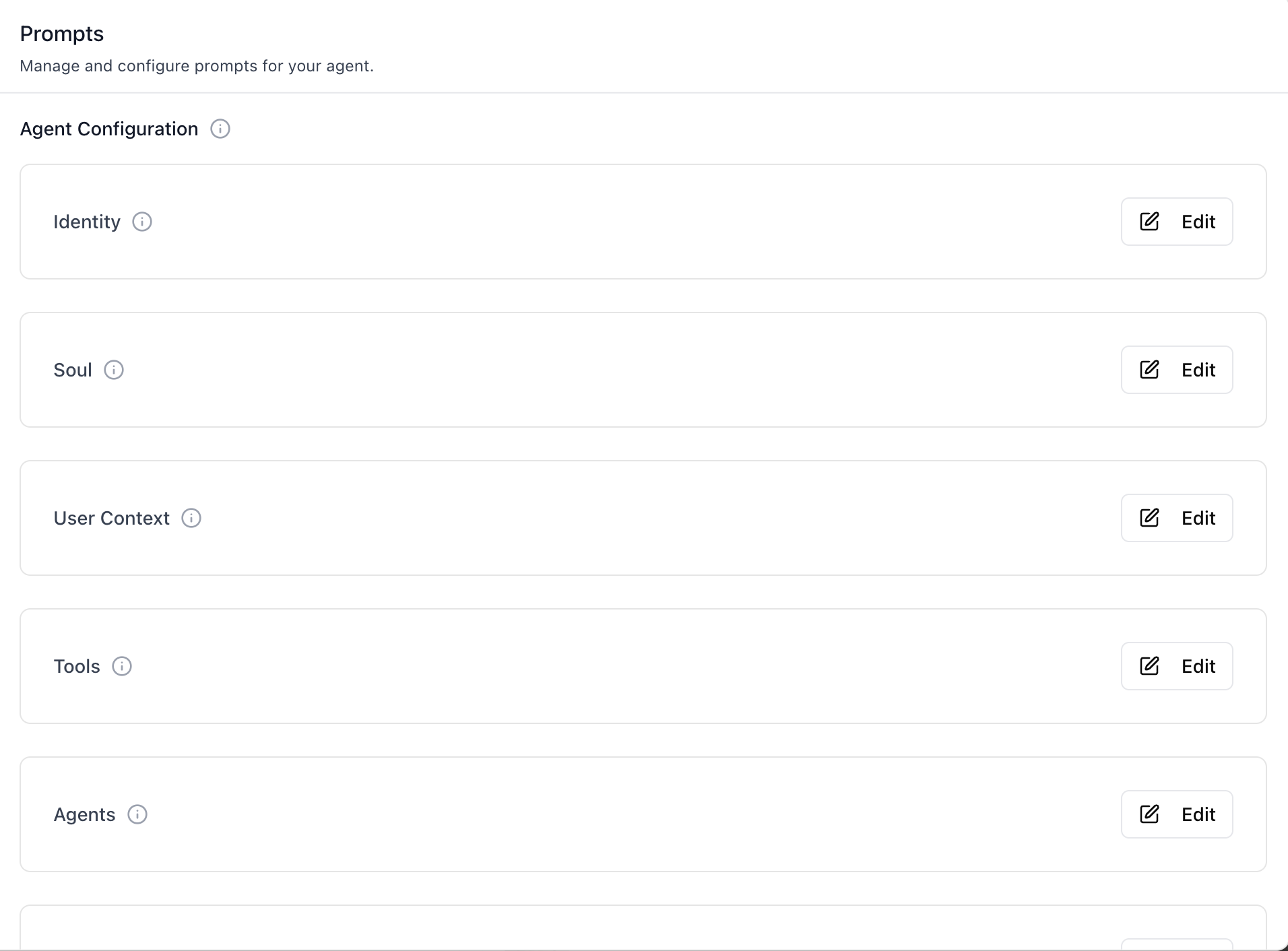
Add the agent Sandbox tab -- a three-section workspace that connects an agent to an OpenClaw sandbox instance, edits the agent-workspace prompt files (Identity, Soul, User Context, Tools, Agents, Bootstrap, Heartbeat, Memory) backing the agent's runtime behaviour, and assigns reusable Skills to the agent with toggleable enable/disable. Push pulls the current configuration onto the connected sandbox; Auto Push on Save pushes after every edit.
Do NOT add custom styles, colors, or CSS overrides to ibl.ai SDK components. They ship with their own styling. Keep the components as-is. Do NOT implement dark mode unless the user explicitly asks for it.
When building custom UI around SDK components, use the ibl.ai brand:
- Primary:
#0058cc, Gradient:linear-gradient(135deg, #00b0ef, #0058cc) - Button:
bg-gradient-to-r from-[#2563EB] to-[#93C5FD] text-white - Font: System sans-serif stack, Style: shadcn/ui new-york variant
- Follow the component hierarchy: use ibl.ai SDK components
(
@iblai/iblai-js) first, then shadcn/ui for everything else (npx shadcn@latest add <component>). Do NOT write custom components when an ibl.ai or shadcn equivalent exists. Both share the same Tailwind theme and render in ibl.ai brand colors automatically. - Follow BRAND.md for colors, typography, spacing, and component styles.
You MUST run /iblai-ops-test before telling the user the work is ready.
After all work is complete, start a dev server (pnpm dev) so the user
can see the result at http://localhost:3000.
iblai.env is NOT a .env.local replacement — it only holds the 3
shorthand variables (DOMAIN, PLATFORM, TOKEN). Next.js still reads
its runtime env vars from .env.local.
Use pnpm as the default package manager. Fall back to npm if pnpm
is not installed.
Common setup (brand, conventions, env files, verification): see docs/skill-setup.md.
Prerequisites
- Auth must be set up first (
/iblai-auth) - MCP server + skills configured (
@iblai/mcpin.mcp.json) - Ask the user for a real
mentorId(agent UUID). Do NOT invent one. - A reachable OpenClaw instance URL plus a Gateway Token to register the first instance. Without one, the Sandbox section sits empty ("Add Instance") and the Prompts / Skills sections are gated until a config is connected.
Step 1: Check Environment
Before proceeding, check for an iblai.env in the project root. Look for
PLATFORM, DOMAIN, and TOKEN variables. If the file does not exist or
is missing these variables, tell the user:
"You need an iblai.env with your platform configuration. Download the
template and fill in your values:
curl -o iblai.env https://raw.githubusercontent.com/iblai/vibe/refs/heads/main/iblai.env"
Step 2: Mount the three sections
SandboxConfig, AgentConfigPrompts, and AgentSkills are independent
components — none of them reads from AgentSettingsProvider. They each
take platformKey and mentorUniqueId as required props. Compose them
on a single page so the user sees Sandbox → Prompts → Skills, top to
bottom.
// app/(app)/agents/[mentorId]/sandbox/page.tsx
"use client";

import { useEffect, useState } from "react";
import { useParams } from "next/navigation";
import {
  SandboxConfig,
  AgentConfigPrompts,
  AgentSkills,
} from "@iblai/iblai-js/web-containers";

export default function AgentSandboxPage() {
  const { mentorId } = useParams<{ mentorId: string }>();
  const [platformKey, setPlatformKey] = useState("");
  const [username, setUsername] = useState("");

  useEffect(() => {
    try {
      const raw = localStorage.getItem("userData");
      if (raw) {
        const parsed = JSON.parse(raw);
        setUsername(parsed.user_nicename ?? parsed.username ?? "");
      }

      const resolvedTenant =
        localStorage.getItem("app_tenant") ??
        (() => {
          try {
            return JSON.parse(localStorage.getItem("current_tenant") ?? "{}").key;
          } catch { return undefined; }
        })() ??
        localStorage.getItem("tenant") ??
        "";
      setPlatformKey(resolvedTenant);
    } catch {}
  }, []);

  if (!platformKey) return null;

  return (
    <div className="flex h-full flex-col gap-8 bg-white p-6">
      <SandboxConfig
        platformKey={platformKey}
        mentorUniqueId={mentorId}
        username={username}
      />
      <AgentConfigPrompts
        platformKey={platformKey}
        mentorUniqueId={mentorId}
      />
      <AgentSkills
        platformKey={platformKey}
        mentorUniqueId={mentorId}
      />
    </div>
  );
}
AgentConfigPrompts and AgentSkills self-gate on the connected
sandbox config — they each call useGetClawMentorConfigQuery and
short-circuit when no config exists, so it is safe (and intended) to
mount all three together. The Prompts and Skills sections appear only
after the user connects an instance.
SandboxConfig's username prop is optional — if omitted, the
component falls back to getUserName() (which reads from
localStorage.userData). Pass it explicitly when you already have it
to avoid the extra read.
Step 2.5: Enable the Sandbox tab for an agent (enable_claw)
The Sandbox feature is off by default per agent. Whether the
Sandbox tab is shown is governed by enable_claw (boolean) on the
agent's settings — true = show, false/missing = hide. The three
sandbox components themselves render their UI unconditionally; it is
the host app's job to gate the navigation entry and route based on
this flag, so users only see the "advanced" sandbox surface for
agents where it has been opted in.
Reading the flag
import { useGetMentorSettingsQuery } from "@iblai/iblai-js/data-layer";

const { data: settings } = useGetMentorSettingsQuery({
  org: platformKey,
  mentor: mentorId,
});

const sandboxEnabled = settings?.enable_claw === true;
Use sandboxEnabled to:
- Hide the Sandbox tab from the agent-settings nav when
false. - Redirect or render a "Sandbox is disabled for this agent" notice on the route when the user lands on it directly.
// app/(app)/agents/[mentorId]/sandbox/page.tsx
if (!settings) return null;
if (!sandboxEnabled) {
  return (
    <div className="p-6 text-sm text-gray-500">
      Sandbox is disabled for this agent.
    </div>
  );
}
return (
  <div className="flex h-full flex-col gap-8 bg-white p-6">
    <SandboxConfig platformKey={platformKey} mentorUniqueId={mentorId} username={username} />
    <AgentConfigPrompts platformKey={platformKey} mentorUniqueId={mentorId} />
    <AgentSkills platformKey={platformKey} mentorUniqueId={mentorId} />
  </div>
);
Toggling the flag
enable_claw is set via the standard agent-settings endpoint
(PUT mentors/{mentor_unique_id}/settings/). Toggle it from wherever
your app exposes per-agent admin controls (e.g. the Settings tab in
/iblai-agent-setting, or a tenant-admin row action):
import { useEditMentorJsonMutation } from "@iblai/iblai-js/data-layer";

const [editMentorJson] = useEditMentorJsonMutation();

await editMentorJson({
  mentorId,
  org: platformKey,
  userId: username,
  requestBody: { enable_claw: true },
}).unwrap();
The same mutation un-gates / re-gates the tab — pass false to hide
it again. Pre-existing instances and bound configs are preserved
across toggles; flipping the flag only affects visibility, not data.
Step 3: Use MCP Tools for Customization
get_component_info("SandboxConfig")
get_component_info("AgentConfigPrompts")
get_component_info("AgentSkills")
get_component_info("LLMProviderModal")
Component Props
All three components import from @iblai/iblai-js/web-containers.
<SandboxConfig>
| Prop | Type | Required | Description |
|---|---|---|---|
platformKey |
string |
Yes | Tenant / org slug |
mentorUniqueId |
string |
Yes | Agent UUID |
username |
string | null |
No | Current user. Falls back to getUserName() from localStorage when omitted |
<AgentConfigPrompts>
| Prop | Type | Required | Description |
|---|---|---|---|
platformKey |
string |
Yes | Tenant / org slug |
mentorUniqueId |
string |
Yes | Agent UUID |
<AgentSkills>
| Prop | Type | Required | Description |
|---|---|---|---|
platformKey |
string |
Yes | Tenant / org slug |
mentorUniqueId |
string |
Yes | Agent UUID |
What each section renders
Sandbox (instance management + connection)
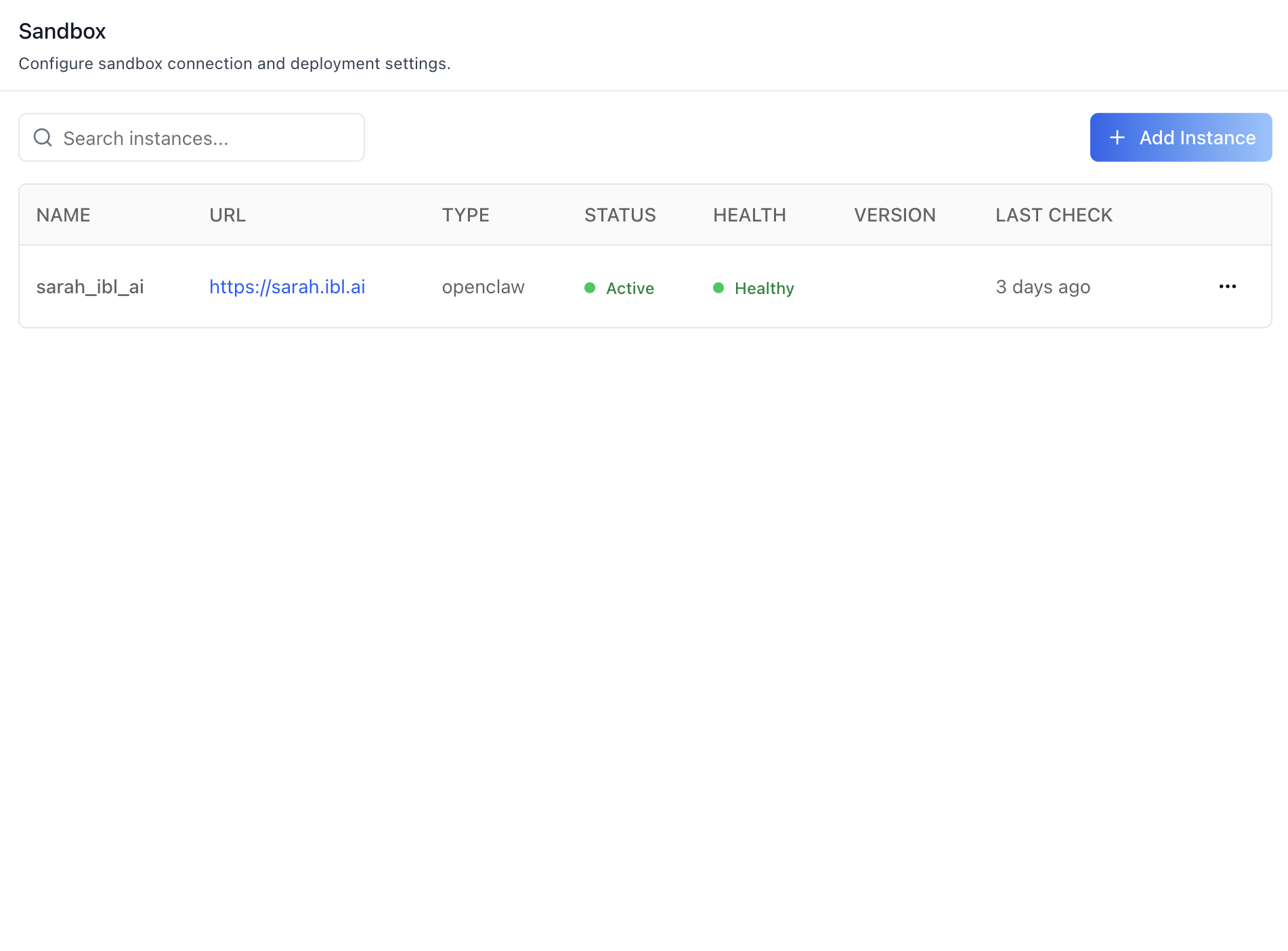
- Instances table — searchable, paginated (5 per page). Columns: Name, URL, Type, Status (Active / Error), Health (Healthy / Unhealthy with full error in tooltip), Version, Last Check.
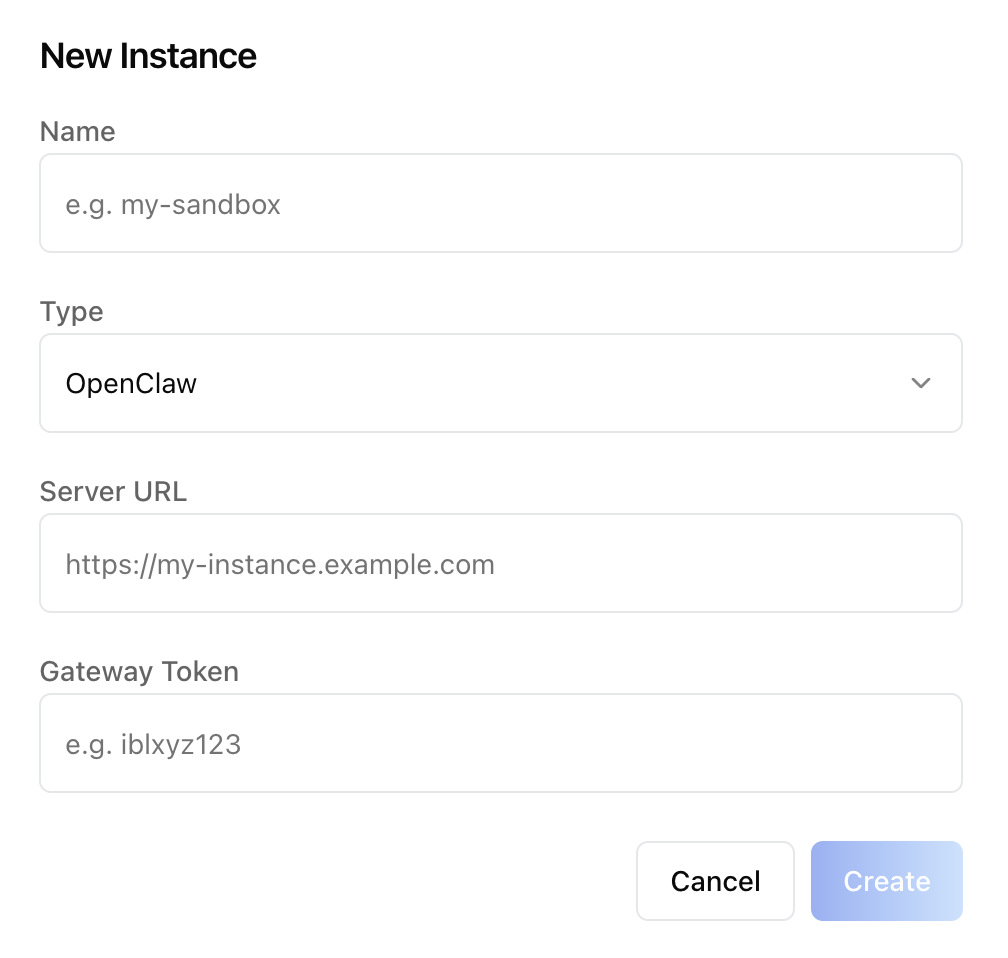
- Add Instance — opens a "New Instance" dialog: Name, Type
(
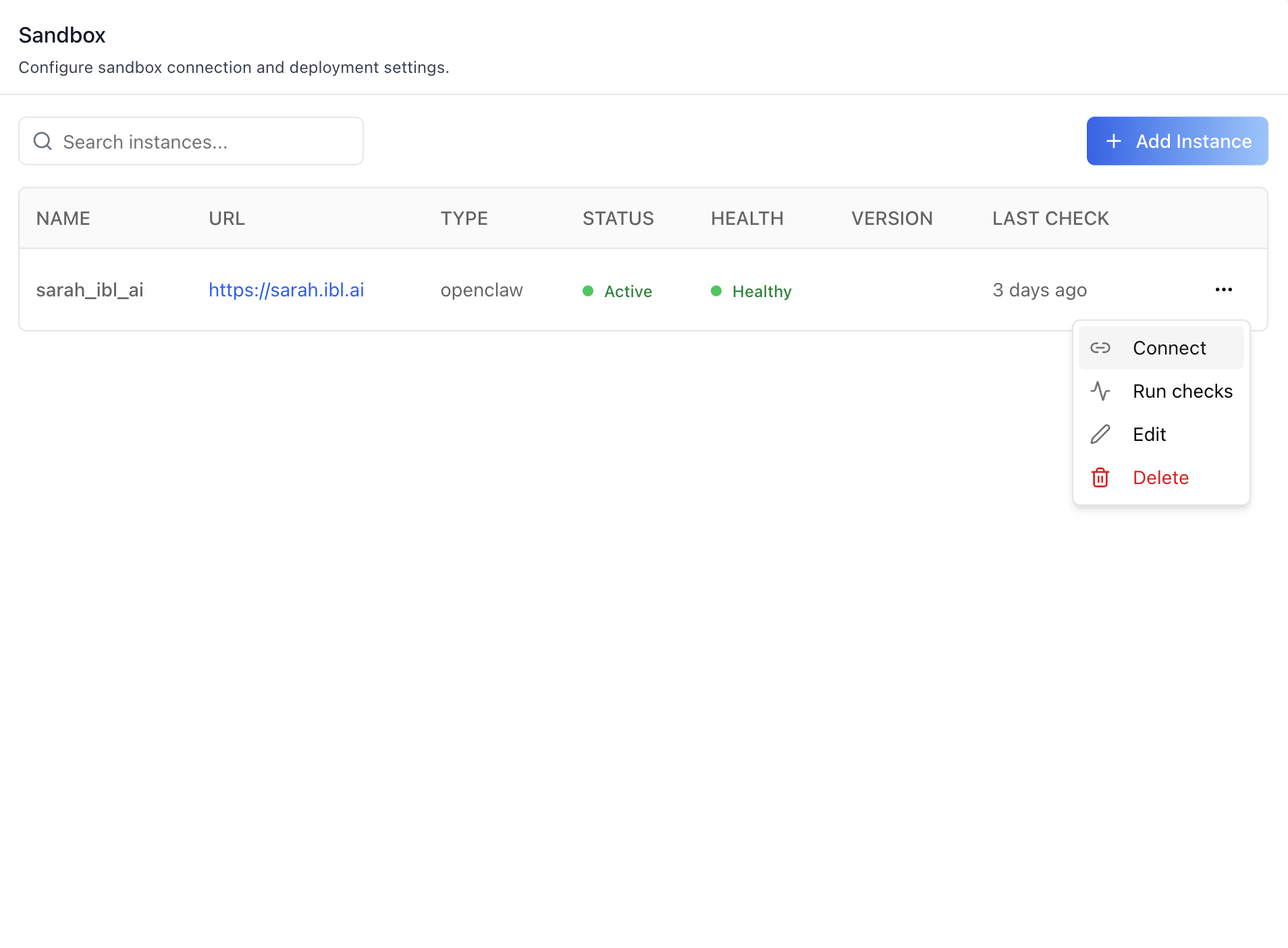
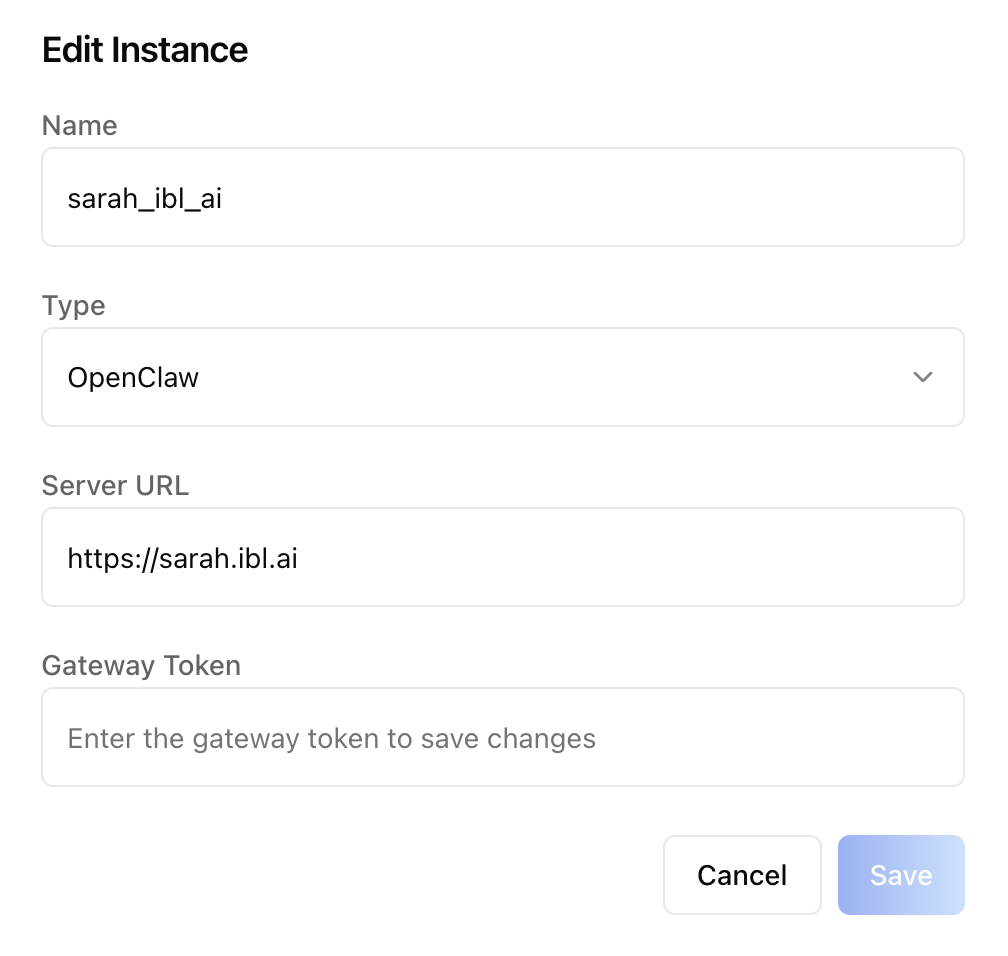
OpenClaw), Server URL, Gateway Token. The token write-only — never read back from the API. - Per-row actions (kebab menu): Connect (binds this instance to the current agent), Run checks (health + connectivity ping), Edit (gateway token re-prompt; leave blank to keep existing), Delete.
- Connected Instance card — once an agent is bound, the table collapses into a card showing Name, URL, Status, Health, Last Check, with Run checks and Disconnect actions.
- Auto Push on Save — when on, every prompt edit pushes to the sandbox. When off, the user pushes manually.
- Push Configuration — manual Push button + "Last pushed" / "Never pushed" indicator. Disabled when the agent has no populated prompt fields (the API rejects empty pushes server-side and we mirror that locally).
- Model — opens the
LLMProviderModalto pick a provider / model ({provider}/{name}). Writes to the agent config'smodelfield.
Prompts (agent workspace files)
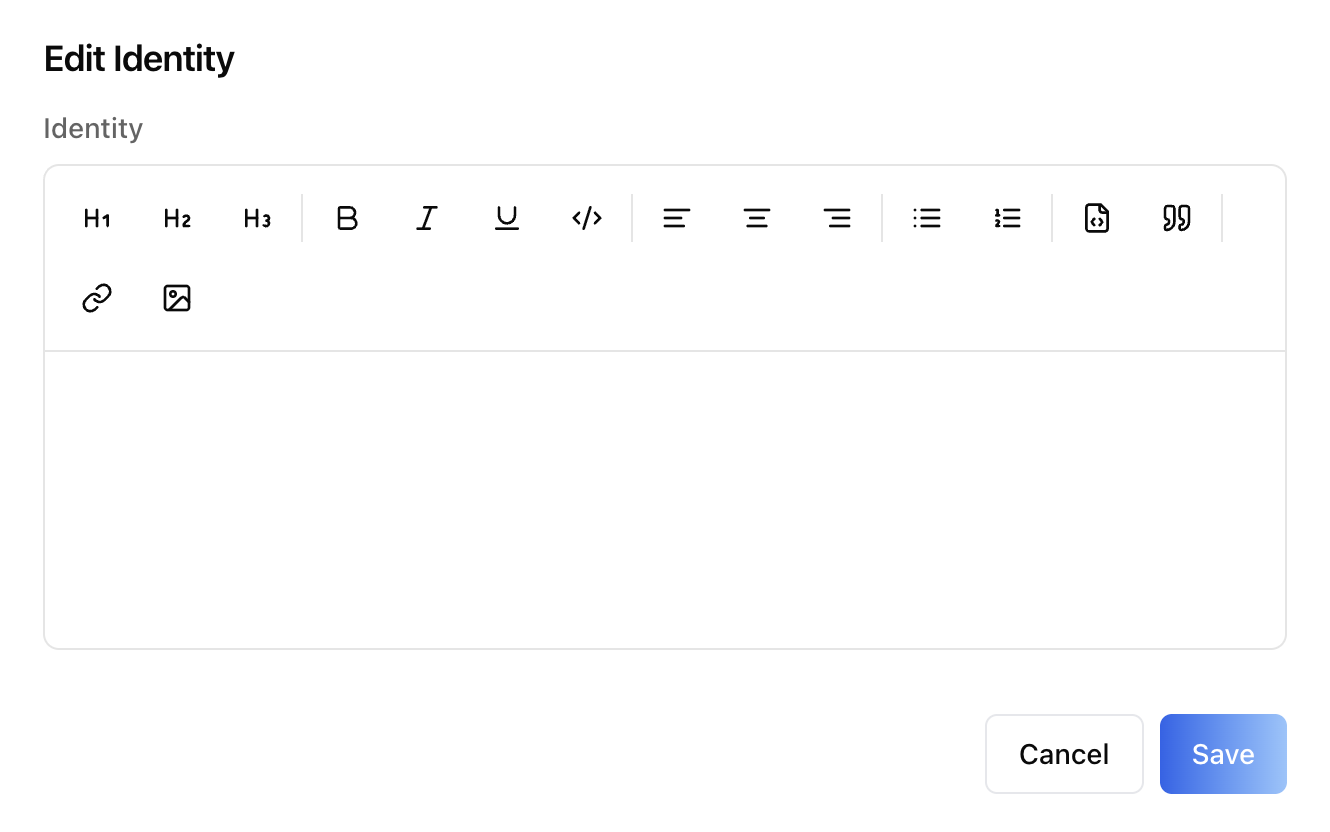
Eight rows, each with a (i) info tooltip and an Edit button
that opens a RichTextEditor modal:
| Field | Backed by | Purpose |
|---|---|---|
| Identity | IDENTITY.md |
Agent persona, name, creature type, visual description |
| Soul | SOUL.md |
Behavioural guidelines, personality, communication style |
| User Context | USER.md |
Deployment context, SSH hosts, device names, TTS voices |
| Tools | TOOLS.md |
Tool usage notes, device names, API aliases |
| Agents | AGENTS.md |
Multi-agent routing, agent ids, workspaces |
| Bootstrap | BOOTSTRAP.md |
One-time first-run instructions |
| Heartbeat | HEARTBEAT.md |
Periodic task definitions |
| Memory | MEMORY.md |
Seed memory, curated long-term facts |
Updates are upserts — the first PATCH bootstraps the row.
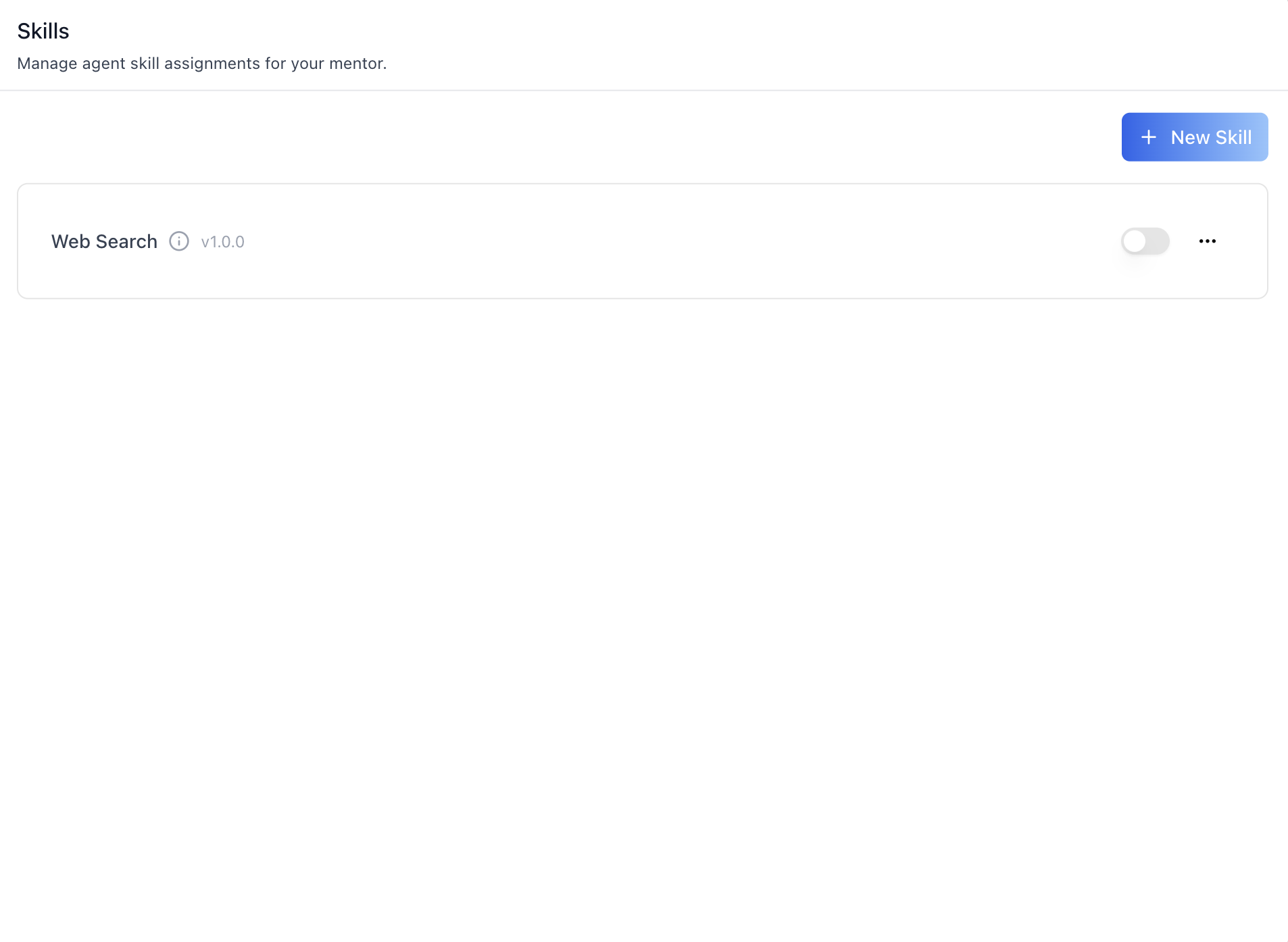
Skills (reusable instruction bundles)
- Skills table — name, version (
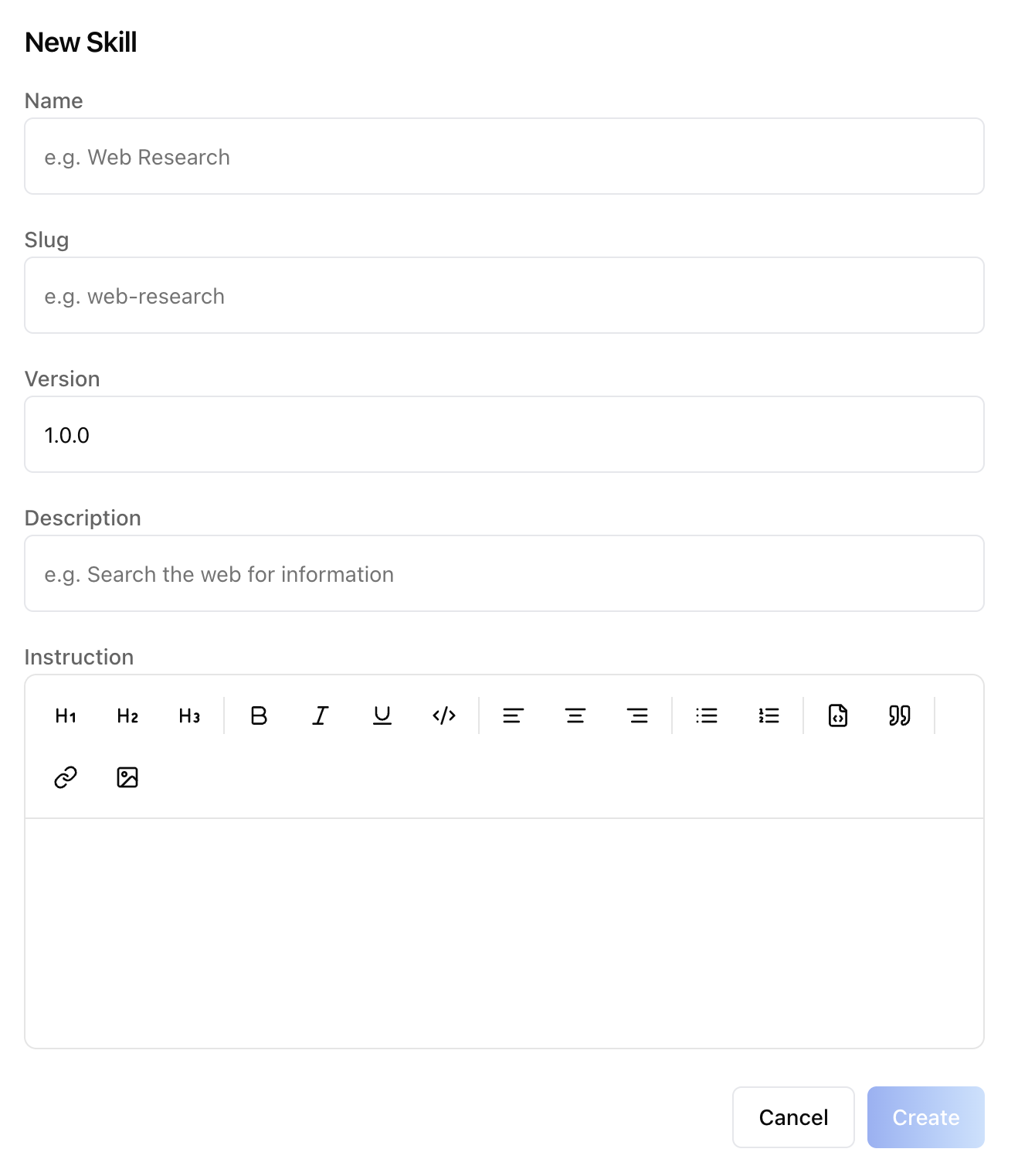
v1.0.0), info tooltip, enable/disable switch, kebab (Edit / Delete). - New Skill dialog — Name, Slug, Version (default
1.0.0), Description, Instruction (RichTextEditor). - Toggle — flipping a skill on creates or re-enables a
MentorSkillAssignmentkeyed by skill UUID; flipping off deletes it. Onlyenabled=trueskills are shown in the toggle list. - Skill CRUD is platform-level (visible to every agent in the tenant); assignment is agent-level.
Related Exports
From @iblai/iblai-js/web-containers:
SandboxConfig,AgentConfigPrompts,AgentSkills— the three section components.LLMProviderModal— provider/model picker used by the Model row. Mountable standalone (e.g. for an "override default model" flow outside the sandbox).getLLMProviderDetails,canSwitchLLm,canSwitchProvider— helpers for custom UI that needs to mirror the model-picker rules.LLMProvider,Provider— types for the picker.
From @iblai/data-layer:
useGetClawMentorConfigQuery,useCreateClawMentorConfigMutation,useDeleteClawMentorConfigMutation,usePushClawConfigMutation— connect / disconnect / push.useGetClawInstancesQuery,useCreateClawInstanceMutation,useUpdateClawInstanceMutation,useDeleteClawInstanceMutation,useHealthCheckClawInstanceMutation,useTestConnectivityClawInstanceMutation— instance CRUD + checks.useGetAgentConfigQuery,useUpdateAgentConfigMutation— prompt fields + model.useGetAgentSkillsQuery,useGetMentorSkillAssignmentsQuery,useCreateAgentSkillMutation,useUpdateAgentSkillMutation,useDeleteAgentSkillMutation,useCreateMentorSkillAssignmentMutation,useUpdateMentorSkillAssignmentMutation,useDeleteMentorSkillAssignmentMutation— skills + assignments.AgentSkill,MentorSkillAssignment— payload types.
Step 4: Verify
Run /iblai-ops-test before telling the user the work is ready:
pnpm build-- must pass with zero errorspnpm test-- vitest must pass- Start dev server and touch test:
pnpm dev &
npx playwright screenshot http://localhost:3000/agents/<id>/sandbox /tmp/agent-sandbox.png
Important Notes
- Redux store: Must include
mentorReducerandmentorMiddleware initializeDataLayer(): 5 args (v1.2+)@reduxjs/toolkit: Deduplicated via webpack aliases innext.config.ts- Peer deps:
sonnerand@iblai/iblai-web-mentormust be installed (pnpm add sonner @iblai/iblai-web-mentor) - No
AgentSettingsProvider: All three components take raw props. If your app already mountsAgentSettingsProviderfor sibling tabs, read its values viauseAgentSettings()in the page wrapper and forward them. mentorUniqueIdvsmentorId: The sandbox endpoints key on the agent's UUID (calledmentorUniqueIdin the SDK), not the integer pk. Pass the same UUID you use everywhere else in the agent-* family.- Gateway token write-only: The token is required to add an instance and required again when editing if you want to rotate it, but the API never returns it. Leaving the field blank on edit keeps the existing value.
- Push gating:
usePushClawConfigMutationreturns400 No configuration to pushwhen every agent-config field is empty. The component mirrors that gate locally — the manual Push button is disabled until the user has saved at least one prompt. - Skill UUID, not pk:
MentorSkillAssignment.skillis the skill'sunique_id, not the integer id. Custom UI joining skills to assignments must key onskill.unique_id. - 404 ≠ error:
useGetClawMentorConfigQuery404s when no agent has been bound to a sandbox — that's the "not connected" state, not a failure. The component treatsisErrorasnullhere. Custom consumers should do the same. enable_clawgate (advanced toggle): The Sandbox tab is hidden per agent untilenable_claw === trueon its settings. The SDK components do not enforce this gate themselves — the host app reads it fromuseGetMentorSettingsQueryand decides whether to render the tab and route (see Step 2.5). Toggle witheditMentorJson({ enable_claw: true | false }). Existing instances and configs are preserved across toggles.- Brand guidelines: BRAND.md
Sandbox REST API
For custom UI beyond these three components. All endpoints are
prefixed with ${dmUrl}/api/ai-mentor/orgs/{org}/ where dmUrl is
NEXT_PUBLIC_API_BASE_URL. Auth: Authorization: Token <token>.
Tab gate (agent settings)
| Method | Path | Body |
|---|---|---|
| GET | mentors/{mentor_unique_id}/settings/ |
Returns the full settings object, including enable_claw: boolean |
| PUT | mentors/{mentor_unique_id}/settings/ |
{ "enable_claw": true } to show the Sandbox tab for this agent, false to hide it |
enable_claw is the per-agent "advanced sandbox" toggle. The host
app must read it and gate the tab — the SDK components do not.
Instances (tenant-scoped)
| Method | Path | Purpose |
|---|---|---|
| GET | claw-instances/ |
List instances |
| POST | claw-instances/ |
Register a new instance |
| PATCH | claw-instances/{id}/ |
Update name / URL / type / token |
| DELETE | claw-instances/{id}/ |
Delete |
| POST | claw-instances/{id}/health-check/ |
Run a health probe |
| POST | claw-instances/{id}/test-connectivity/ |
Run a connectivity probe |
Create / update body:
{
  "name": "sarah_ibl_ai",
  "server_url": "https://sarah.ibl.ai",
  "claw_type": "openclaw",
  "gateway_token": "ibl..."
}
gateway_token is write-only. Omit on update to keep the existing value.
Sandbox binding (binds an instance to an agent)
| Method | Path | Purpose |
|---|---|---|
| GET | mentors/{mentor_unique_id}/claw-config/ |
Read current binding (404 = not connected) |
| POST | mentors/{mentor_unique_id}/claw-config/ |
Connect — body { "server": <instanceId>, "enabled": true } |
| DELETE | mentors/{mentor_unique_id}/claw-config/ |
Disconnect |
| POST | mentors/{mentor_unique_id}/claw-config/push/ |
Push current agent config to the sandbox |
push returns 400 No configuration to push when every agent-config
field is empty. Pre-flight by checking the agent config locally.
Agent configuration (prompts + model)
| Method | Path | Purpose |
|---|---|---|
| GET | mentors/{mentor_unique_id}/agent-config/ |
Read prompts + model |
| PATCH | mentors/{mentor_unique_id}/agent-config/ |
Upsert — first write bootstraps the row |
Body fields: identity, soul, user_context, tools,
agents, bootstrap, heartbeat, memory (each is the markdown
body of the corresponding *.md workspace file), plus model
("{provider}/{name}").
Agent skills (platform-level catalog)
| Method | Path | Purpose |
|---|---|---|
| GET | agent-skills/ |
List skills available in the tenant |
| POST | agent-skills/ |
Create a skill — { name, slug, version, description, instruction } |
| PATCH | agent-skills/{id}/ |
Update |
| DELETE | agent-skills/{id}/ |
Delete |
Agent skill assignments (per-agent binding)
| Method | Path | Purpose |
|---|---|---|
| GET | mentors/{mentor_unique_id}/skill-assignments/ |
Skills bound to this agent |
| POST | mentors/{mentor_unique_id}/skill-assignments/ |
Bind — { "skill": "<skill-uuid>", "enabled": true } |
| PATCH | mentors/{mentor_unique_id}/skill-assignments/{id}/ |
Toggle enabled |
| DELETE | mentors/{mentor_unique_id}/skill-assignments/{id}/ |
Unbind |
The skill field is the UUID (unique_id), not the integer
primary key — keying assignments by unique_id keeps the binding
stable across skill edits.
Common errors
404 Not Foundonclaw-config/— the agent isn't connected. Treat as the "not connected" state, not a failure.400 No configuration to push— at least one prompt field must be populated before pushing.400 Gateway token required— required on instance create; on edit only when rotating.