 By
By name: iblai-agent-dataset description: Add the agent Datasets tab (searchable dataset table with upload) to your Next.js app globs: alwaysApply: false
/iblai-agent-dataset
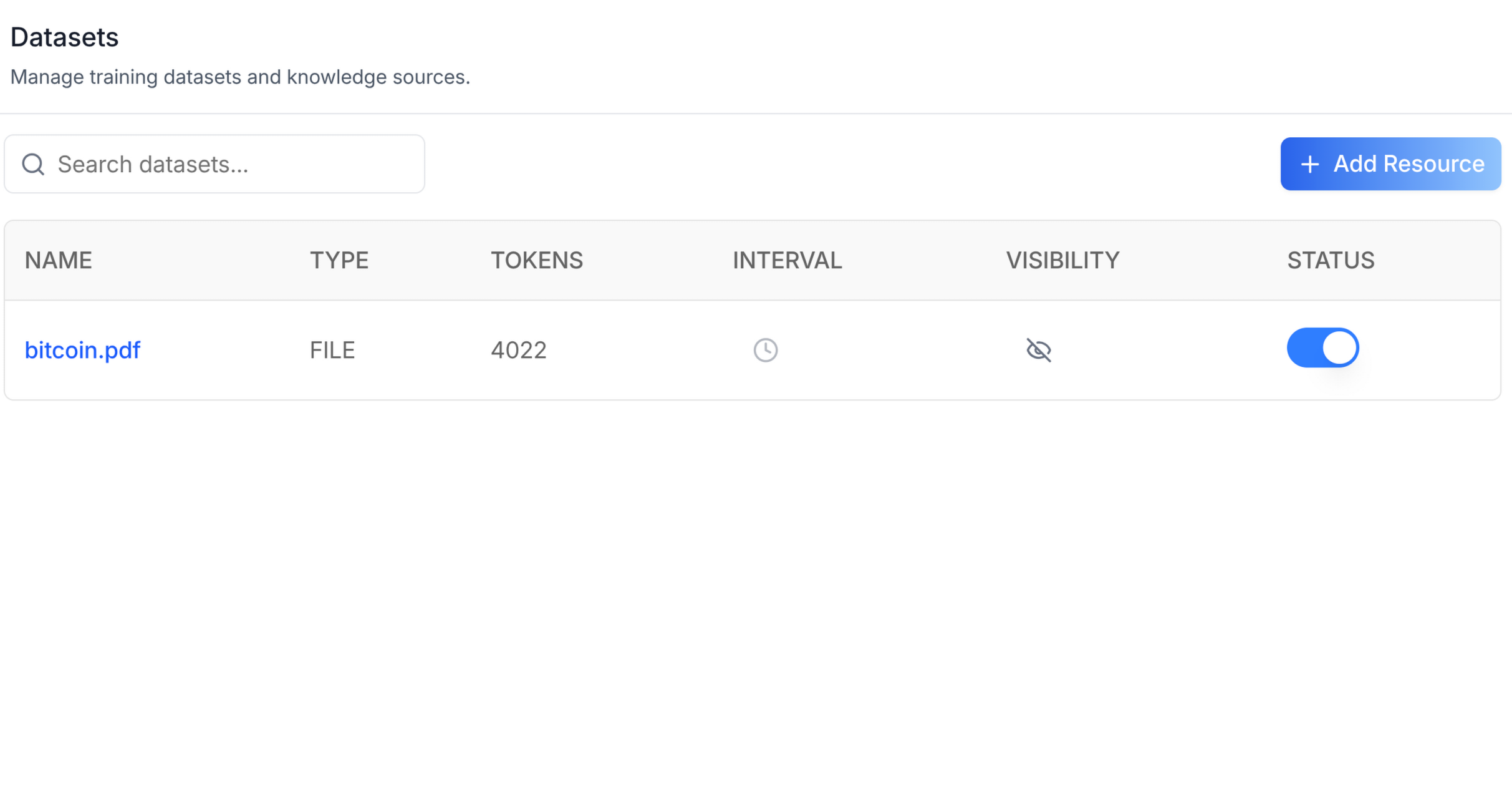
Add the agent Datasets tab -- a searchable, paginated table of datasets
with columns for name, type, tokens, interval, visibility, and status.
Includes an "Add Resource" slot for file uploads and a delete action per
row. This is one tab in the wider agent-settings family. All tabs share
the same AgentSettingsProvider wrapper.
Do NOT add custom styles, colors, or CSS overrides to ibl.ai SDK components. They ship with their own styling. Keep the components as-is. Do NOT implement dark mode unless the user explicitly asks for it.
When building custom UI around SDK components, use the ibl.ai brand:
- Primary:
#0058cc, Gradient:linear-gradient(135deg, #00b0ef, #0058cc) - Button:
bg-gradient-to-r from-[#2563EB] to-[#93C5FD] text-white - Font: System sans-serif stack, Style: shadcn/ui new-york variant
- Follow the component hierarchy: use ibl.ai SDK components
(
@iblai/iblai-js) first, then shadcn/ui for everything else (npx shadcn@latest add <component>). Do NOT write custom components when an ibl.ai or shadcn equivalent exists. Both share the same Tailwind theme and render in ibl.ai brand colors automatically. - Follow BRAND.md for colors, typography, spacing, and component styles.
You MUST run /iblai-ops-test before telling the user the work is ready.
After all work is complete, start a dev server (pnpm dev) so the user
can see the result at http://localhost:3000.
iblai.env is NOT a .env.local replacement — it only holds the 3
shorthand variables (DOMAIN, PLATFORM, TOKEN). Next.js still reads
its runtime env vars from .env.local.
Use pnpm as the default package manager. Fall back to npm if pnpm
is not installed.
Common setup (brand, conventions, env files, verification): see docs/skill-setup.md.
Prerequisites
- Auth must be set up first (
/iblai-auth) - MCP server + skills configured (
@iblai/mcpin.mcp.json) AgentSettingsProvidermust wrap the route (see/iblai-agent-settingStep 2 if not already set up)- Ask the user for a real
mentorId(agent UUID). Do NOT invent one.
Step 1: Check Environment
Before proceeding, check for an iblai.env in the project root. Look for
PLATFORM, DOMAIN, and TOKEN variables. If the file does not exist or
is missing these variables, tell the user:
"You need an iblai.env with your platform configuration. Download the
template and fill in your values:
curl -o iblai.env https://raw.githubusercontent.com/iblai/vibe/refs/heads/main/iblai.env"
Step 2: Mount AgentDatasetsTab
// app/(app)/agents/[mentorId]/datasets/page.tsx
"use client";

import { AgentDatasetsTab } from "@iblai/iblai-js/web-containers/next";

export default function AgentDatasetsPage() {
  return (
    <div className="flex h-full flex-col bg-white">
      <AgentDatasetsTab />
    </div>
  );
}
With custom Add Resource modal
The AddResourceModal prop is a render slot for file upload UI. When
omitted, the "Add Resource" button is shown but no modal opens. Inject
your own implementation:
<AgentDatasetsTab
  AddResourceModal={({ isOpen, onClose }) => (
    <MyUploadModal open={isOpen} onClose={onClose} />
  )}
/>
With pagination
Inject a pagination component via the PaginationComponent prop:
<AgentDatasetsTab
  PaginationComponent={({ currentPage, totalPages, onPageChange, disabled }) => (
    <MyPagination
      page={currentPage}
      total={totalPages}
      onChange={onPageChange}
      disabled={disabled}
    />
  )}
/>
Step 3: Customize Labels (Optional)
import { AgentDatasetsTab } from "@iblai/iblai-js/web-containers/next";

<AgentDatasetsTab
  labels={{
    header: { title: "Training data" },
  }}
/>;
Step 4: Use MCP Tools for Customization
get_component_info("AgentDatasetsTab")
get_component_info("AgentSettingsProvider")
<AgentDatasetsTab> Props
Import from @iblai/iblai-js/web-containers/next.
| Prop | Type | Required | Description |
|---|---|---|---|
labels |
DeepPartial<DatasetsTabLabels> |
No | Override user-visible strings |
onSelect |
(dataset: Dataset) => void |
No | Called when a dataset row is selected |
selectedDatasetId |
string |
No | Highlight the row matching this ID |
AddResourceModal |
ComponentType<{ isOpen, onClose, keepParentOpen? }> |
No | Custom upload modal. Without it the button shows but no modal opens |
PaginationComponent |
ComponentType<{ currentPage, totalPages, onPageChange, disabled }> |
No | Custom pagination. Without it no pagination UI renders |
Related Exports
From @iblai/iblai-js/web-containers/next:
DatasetsTabLabels-- type for the full label bundle.Dataset-- type for a single dataset row.
Step 5: Verify
Run /iblai-ops-test before telling the user the work is ready:
pnpm build-- must pass with zero errorspnpm test-- vitest must pass- Start dev server and touch test:
pnpm dev &
npx playwright screenshot http://localhost:3000/agents/<id>/dataset /tmp/agent-dataset.png
Important Notes
- Redux store: Must include
mentorReducerandmentorMiddleware initializeDataLayer(): 5 args (v1.2+)@reduxjs/toolkit: Deduplicated via webpack aliases innext.config.ts- Peer deps:
sonnerand@iblai/iblai-web-mentormust be installed (pnpm add sonner @iblai/iblai-web-mentor) - Shared provider:
AgentSettingsProvidermust wrap the route at a layout level. See/iblai-agent-settingStep 2 for the full snippet. - AddResourceModal: The standalone app uses Dropbox/Google Drive/OneDrive pickers with deep dependencies. Consumers inject their own implementation to avoid pulling in those deps.
- Brand guidelines: BRAND.md